CaptnBoat.com
Instant Booking – Capt’n Boat
Capt’n Boat is launching Instant Booking, allowing boat owners to recruit you directly as soon as a mission matches your profile and the conditions you have set (minimum salary, region, availability period, etc.).
Key points to remember:
👉 Update the Capt’n Boat app to access this feature. Simply open the app: a pop-up window will automatically appear if an update is required.
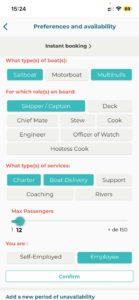
👉 Fill in your preferences and unavailable periods. Otherwise, the system will automatically consider you available.
How does Instant Booking work?
By activating this option, you agree to accept any booking request received through Capt’n Boat, provided it matches the criteria you have defined (boat type, onboard role, mission type, etc.).
Boat owners can therefore recruit you instantly and with confidence.
How do I activate Instant Booking?
Instant Booking is disabled by default. You need to activate it by following these steps:
- Go to Profile
- Open Preferences & Availability
- Select your preferences and click Save
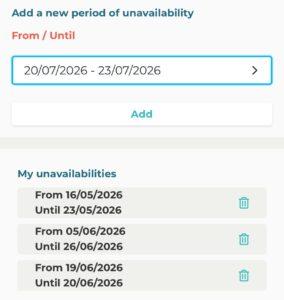
- Enter your availability periods. Make sure to click Add so the period is properly registered
- At the top of the page, access Instant Booking
- Complete the form
- Sign the contract
Please wait while your profile is being validated.
Instant Booking will then be activated.
Mandatory criteria to configure
To avoid receiving unwanted missions, it is essential to properly configure your profile.
All your vacation periods or personal constraints must be entered.
If you do not add any unavailable periods to your calendar, you will automatically be considered available and may be recruited automatically.
📅 Availability period
Choose how far in advance you want to be recruitable: 1 month, 2 months, 3 months, etc.
This period is rolling: if you choose 1 month today, you will be available for all missions starting within the next 30 days. Tomorrow, it will still apply to the following 30 days.
For example, if today your availability extends until May 21, it will automatically extend to May 22 tomorrow, and so on.
⏱️ Minimum mission duration
Specify the minimum mission duration you are willing to accept (a few days, weeks, months, yearly, etc.).
Clearly define the geographical areas where you are willing to sail.
Why activate Instant Booking?
- More missions, faster
- Better visibility among boat owners
- Offers aligned with your preferences
- A stronger relationship of trust
Required actions
To access this feature and ensure it works properly:
✅ Download or update the Capt’n Boat app
✅ Review and adjust your Instant Booking criteria
✅ Accurately enter your unavailable periods
By following these steps, you’ll be ready to receive missions automatically and with complete peace of mind!
Don’t have a Capt’n Boat account yet?
Create your account in just a few minutes and instantly access opportunities across the maritime industry.
Whether you are a beginner, an experienced sailor, a skipper, or a crew member, you will find missions suited to your profile and availability.
All missions offered are legally compliant and include insurance coverage so you can sail with peace of mind. You also benefit from secure and reliable payments with no unpleasant surprises.
Finally, Capt’n Boat simplifies your administrative procedures: the platfor m handles declarations (ENIM, URSSAF) for you, allowing you to focus entirely on your mission.